
Forecast Cash Runway in Excel or Google Sheets
Build a six-month cash runway forecast with monthly cash flow, reserve checks, and an average-burn comparison.
A cash runway forecast shows how expected receipts and payments change available cash each month. This guide builds a six-month forecast that identifies the first month-end when cash reaches or falls below a chosen minimum reserve.
The example, titled Six-Month Cash Runway Forecast, uses synthetic data rather than company data. Before relying on the result, replace its assumptions with verified cash balances, collection timing, payroll payments, and operating costs.
Here, runway means the number of complete forecast months before the first reserve breach. Burn rate means the average amount of cash lost per month when average net cash flow is negative. Because the model uses month-end totals, it doesn’t estimate the exact day cash reaches the reserve.
What You'll Need
- Google Sheets or a current version of Microsoft Excel
- One worksheet named
Runway Forecast - Available unrestricted cash from a recent bank reconciliation
- Monthly cash receipts, payroll payments, and other cash-cost assumptions
- One consistent currency for every amount
- Comma formula separators; some spreadsheet locales require semicolons instead
Step-by-Step Guide
Open the six-month runway template
You can Copy this Google Sheets template or Download the Excel file.
The recorded tests in this guide were run in Google Sheets. Although the Excel file is available for use, those tests didn’t independently verify its execution in Excel.
If you build the sheet manually, use this layout:
| Range | Purpose |
|---|---|
A1 | Six-Month Cash Runway Forecast |
A3:B4 | Starting cash and minimum reserve |
A7:G7 | Monthly schedule headers |
A8:A13 | Month 1 through Month 6 |
B8:D13 | Monthly cash-flow inputs |
E8:G13 | Calculated monthly results |
A15:B18 | Runway summary |
Use these headers in A7:G7:
| Cell | Header |
|---|---|
| A7 | Month |
| B7 | Cash Receipts |
| C7 | Payroll |
| D7 | Other Operating Costs |
| E7 | Net Cash Flow |
| F7 | Projected Ending Cash |
| G7 | Above Buffer |
Each row represents one successive full month. For an operating forecast, replace Month 1 through Month 6 with explicit month-end dates.
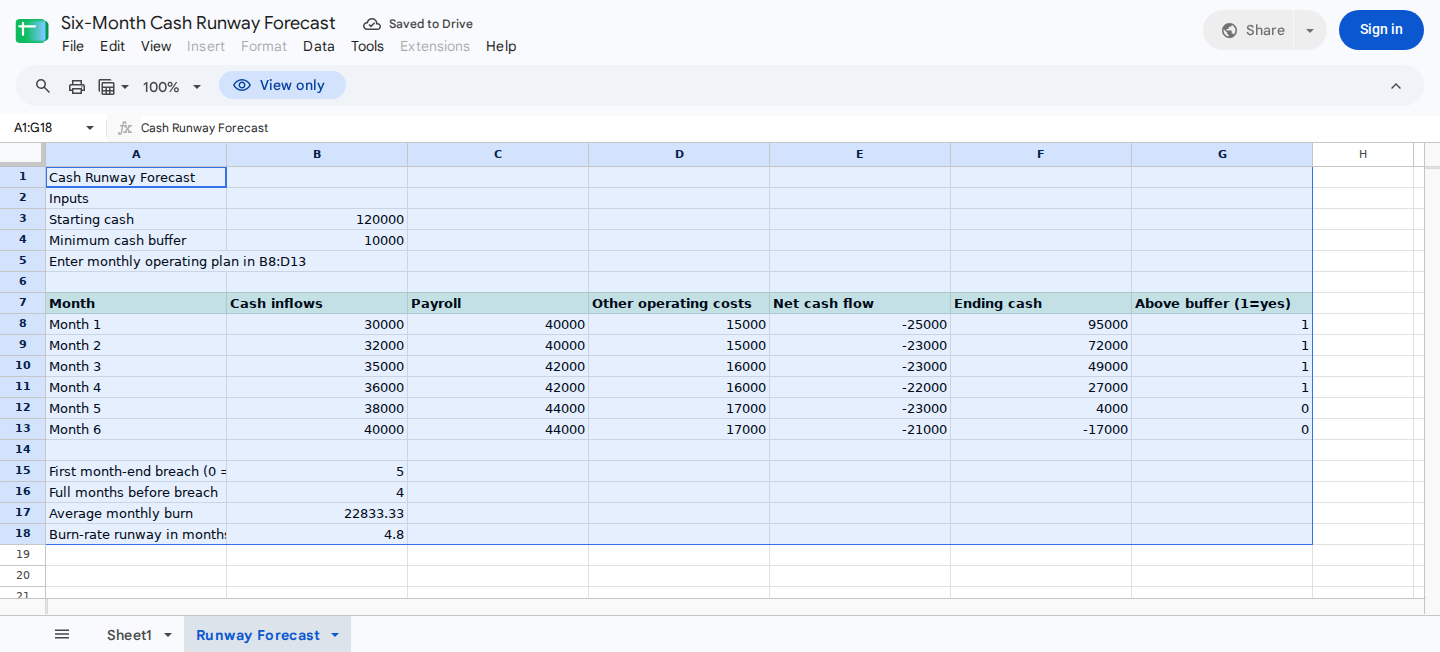
Enter starting cash, reserve, inflows, payroll, and other costs. The sheet calculates projected cash and runway.
Enter starting cash, the reserve, and monthly assumptions
Start by entering available unrestricted cash in Runway Forecast!B3. Exclude restricted funds that can’t pay normal operating expenses.
Next, enter the minimum cash reserve that shouldn’t be spent in Runway Forecast!B4. The model treats projected cash equal to the reserve as a breach, not as cash remaining above the buffer.
For the baseline example, enter:
| Cell | Value |
|---|---|
| B3 | 120000 |
| B4 | 10000 |
Enter the monthly assumptions in A8:D13:
| Month | Cash Receipts | Payroll | Other Operating Costs |
|---|---|---|---|
| Month 1 | 30000 | 40000 | 15000 |
| Month 2 | 32000 | 40000 | 15000 |
| Month 3 | 35000 | 42000 | 16000 |
| Month 4 | 36000 | 42000 | 16000 |
| Month 5 | 38000 | 44000 | 17000 |
| Month 6 | 40000 | 44000 | 17000 |
Specifically:
- Enter expected monthly cash receipts in
B8:B13. - Enter monthly payroll payments in
C8:C13. - Enter other operating cash costs in
D8:D13.
Record receipts when cash is expected to arrive, not when revenue is invoiced or recognized. Likewise, payroll and operating costs should reflect expected payment timing.
All inputs in B3:B4 and B8:D13 must be nonnegative numbers. Record refunds, payroll credits, or cost reimbursements as cash receipts rather than negative expenses. Otherwise, a negative cost could incorrectly increase projected cash.
You can apply number validation of zero or greater to those ranges, but validation may not catch pasted or imported values. As a second control, the formulas in the next steps include nonnegative checks.
Format:
B3:B4,B8:F13, andB17as currencyB18as a number with one decimal place
Calculate monthly cash flow and ending cash
In E8, calculate cash receipts less payroll and other operating costs:
=IF(AND(COUNT(B8:D8)=3,MIN(B8:D8)>=0),B8-C8-D8,NA())
Fill the formula through E13.
This formula requires all three monthly inputs to be numeric and nonnegative. A blank cell, whitespace-only text, text such as TBD, or a negative number returns #N/A. Numeric zero remains valid.
Then, in F8, calculate projected ending cash:
=IF(AND(ISNUMBER($B$3),$B$3>=0,COUNT(B$8:D8)=3*ROWS(B$8:B8),MIN(B$8:D8)>=0),$B$3+SUM(B$8:B8)-SUM(C$8:C8)-SUM(D$8:D8),NA())
Fill the formula through F13.
The formula starts with unrestricted cash in B3, adds cumulative receipts, and subtracts cumulative payroll and operating costs. It checks every input row through the current month, so an invalid earlier input also invalidates later balances.
Finally, use G8 to test whether ending cash remains strictly above the reserve:
=IF(AND(ISNUMBER(F8),ISNUMBER($B$4),$B$4>=0),--(F8>$B$4),NA())
Fill the formula through G13.
The indicator means:
1: Projected ending cash is above the reserve.0: Projected ending cash is equal to or below the reserve.#N/A: A required input, reserve, or calculated balance is invalid.
Review monthly net cash flow, projected ending cash, and buffer indicators in E8:G13.
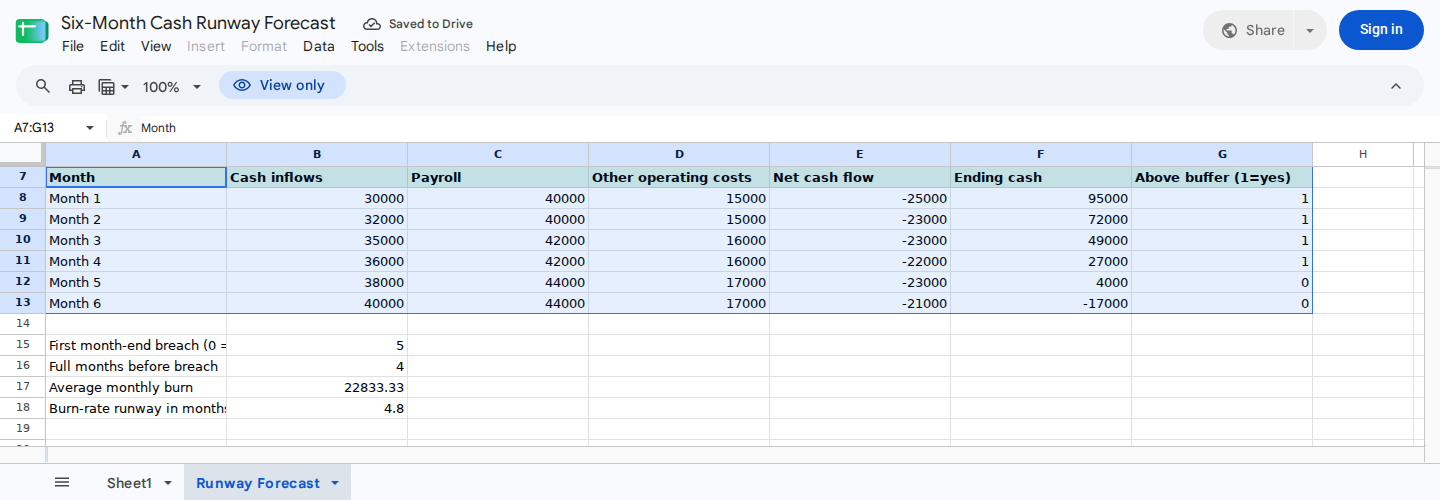
The month-by-month schedule shows when projected ending cash reaches the minimum reserve.
The recorded tests used nonnegative inputs. The nonnegative guards above don’t change the baseline outputs, but their behavior for negative inputs follows from the formulas rather than a separately recorded test.
Calculate the runway summary
Add these summary labels:
| Cell | Entry |
|---|---|
| A15 | First month-end at or below reserve |
| A16 | Complete months before breach |
| A17 | Average monthly burn |
| A18 | Burn-rate runway in months |
In B15, find the first month with ending cash at or below the reserve:
=IF(OR(COUNT(F8:F13)<6,NOT(ISNUMBER($B$4)),$B$4<0),NA(),IFERROR(MATCH(TRUE,F8:F13<=$B$4,0),0))
Interpret the result as follows:
1through6: The corresponding month is the first reserve breach.0: No breach occurs within the six-month forecast.#N/A: The schedule or reserve contains an invalid input.
Next, calculate the number of complete months before the first breach in B16:
=IF(NOT(ISNUMBER(B15)),NA(),IF(B15=0,ROWS(A8:A13),B15-1))
If B15 is 5, the model reports four complete months before the breach. If B15 is 0, B16 returns 6. This means only that all six modeled month-end balances remain strictly above the reserve.
In B17, calculate average monthly net burn:
=IF(COUNT(E8:E13)<6,NA(),MAX(0,-AVERAGE(E8:E13)))
This is the greater of zero and the negative average monthly net cash flow. It’s a simplified comparison measure, not a replacement for the monthly schedule.
In B18, calculate reserve-adjusted runway from average burn:
=IF(OR(NOT(ISNUMBER(B17)),B17<0,NOT(ISNUMBER($B$3)),$B$3<0,NOT(ISNUMBER($B$4)),$B$4<0),NA(),IF(B17=0,0,MAX(0,$B$3-$B$4)/B17))
Read B18 together with B17:
- If
B17is positive,B18estimates reserve-adjusted runway using average burn. - If
B17is zero,B18=0is a sentinel meaning the forecast has no average burn. Use the finite six-month schedule instead. - If starting cash is already at or below the reserve and average burn is positive,
B18=0means zero reserve-adjusted months remain. - If a required input is invalid,
B18returns#N/A.
This approach preserves the zero-average-burn behavior recorded for the linked template. It doesn’t interpret zero average burn as zero months of cash runway.
Verify the baseline result
The recorded Google Sheets test produced these baseline results:
| Month | Net Cash Flow | Projected Ending Cash | Above Buffer |
|---|---|---|---|
| Month 1 | -25000 | 95000 | 1 |
| Month 2 | -23000 | 72000 | 1 |
| Month 3 | -23000 | 49000 | 1 |
| Month 4 | -22000 | 27000 | 1 |
| Month 5 | -23000 | 4000 | 0 |
| Month 6 | -21000 | -17000 | 0 |
The summary should show:
| Cell | Expected result |
|---|---|
| B15 | 5 |
| B16 | 4 |
| B17 | 22833.33 |
| B18 | 4.8 when displayed to one decimal place |
Check the result independently:
Total net burn = 25000 + 23000 + 23000 + 22000 + 23000 + 21000
               = 137000

Average monthly burn = 137000 ÷ 6
                     = 22833.33

Reserve-adjusted cash = 120000 - 10000
                      = 110000

Average-burn runway = 110000 ÷ 22833.33
                    ≈ 4.8 months
The time-phased schedule identifies Month 5 as the first month-end at or below the reserve. By comparison, the average-burn result is 4.8 months. It isn’t an exact depletion date.
Test different operating assumptions
Before each independent scenario, reset the baseline so changes from one case don’t carry into the next.
Increase the Month 1 receipt
Reset to the baseline, then change only B8 from 30000 to 50000.
The recorded Google Sheets execution produced:
Ending cash: 115000, 92000, 69000, 47000, 24000, 3000
B15: 6
B16: 5
B17: 19500
B18: 5.6 when displayed to one decimal place
Although the Month 6 ending balance is positive, it’s below the 10000 reserve. The extra 20000 delays the first month-end reserve breach from Month 5 to Month 6.
Enter zero activity above the reserve
Reset the sheet, then enter:
B3:50000B4:10000- Every cell in
B8:D13:0
The recorded execution produced:
Net cash flow each month: 0
Ending cash each month: 50000
Buffer indicator each month: 1
B15: 0
B16: 6
B17: 0
B18: 0
Because B17 is zero, the B18 result is a no-average-burn sentinel. The schedule establishes only that no breach occurs within the six modeled months.
Check the equality boundary
Reset to the baseline, then change Month 5 receipts in B12 from 38000 to 44000. Month 5 should end with exactly 10000, equal to the reserve.
The formula-derived result should be:
F12: 10000
G12: 0
B15: 5
B16: 4
Cash equal to the reserve isn’t above the buffer.
Check malformed and negative inputs
In a copy of the forecast, clear a required monthly input or enter text such as TBD or whitespace. The affected net cash flow and dependent calculations should return #N/A.
Next, enter a negative receipt, payroll amount, operating cost, starting balance, or reserve. The guarded formulas should also return #N/A instead of treating a negative cost as a cash inflow.
These malformed-input and negative-input checks follow from the formulas; they weren’t part of the recorded execution cases. Restore the baseline inputs afterward.
Also confirm that starting cash appears only in B3. Don’t include it again as a Month 1 receipt.
The example accepts monthly totals rather than transaction rows, so it doesn’t detect duplicated payments or bank transactions.
Model hiring, spending, and financing scenarios
Create a separate copy of the forecast for each scenario you want to compare. Then change the inputs according to when cash is expected to move:
- Hiring: Increase payroll in
C8:C13beginning with the expected payment month. Include employer taxes and benefits if they aren’t already in another cash-cost line. - Operating spending: Change
D8:D13for software, rent, contractors, insurance, taxes, debt payments, or irregular expenses. - Collections: Change
B8:B13when customer payments are expected to arrive. - Financing: Add fundraising proceeds to
B8:B13only in scenarios where the receipt and timing are assumed. Keep uncertain financing separate from the operating baseline. - Refunds and credits: Add expected cash refunds or reimbursements to receipts. Don’t enter negative payroll or operating costs.
If G8:G13 remains 1, every modeled ending balance is strictly above the reserve. That means only that no breach appears within the six-month horizon. Extend the forecast before drawing conclusions about later periods.
If you need linked income statement, balance sheet, and cash flow schedules, use a startup three-statement model instead of expanding this runway schedule into an accounting model.
Review and update the forecast
Update the model whenever actual cash activity or a material assumption changes:
- Replace
B3with the latest reconciled unrestricted cash balance. - Move receipts to the months when collection is now expected.
- Update payroll for hiring, departures, taxes, benefits, and payment timing.
- Add material operating costs, debt service, taxes, and one-time payments to the appropriate months.
- Compare actual cash movement with the prior forecast.
- Confirm that
B15:B18agree with the monthly schedule.
Keep the model’s timing limits in mind during each review. The forecast doesn’t model intramonth payments, so cash could fall below the reserve during a month even if the month-end balance remains above it.
Uncertain receipts, omitted expenses, restricted cash, or delayed collections can also make the displayed runway too optimistic.
Ask ModelMonkey to inspect the runway model
ModelMonkey can use spreadsheet context in Google Sheets and Microsoft Excel to help read ranges, inspect formulas, analyze results, and propose spreadsheet changes. When the workflow presents a preview, review the proposed edits before proceeding.
For this workbook, use this request:
Inspect Runway Forecast!A1:G18.

Check that B3 contains nonnegative unrestricted starting cash and B4 contains a nonnegative minimum reserve. Confirm that B8:D13 contains only nonnegative numbers.

Confirm that E8:E13 calculates receipts minus payroll and other operating costs, F8:F13 projects cash from B3, and G8:G13 returns 1 only when ending cash is strictly above B4.

Compare the first balance in F8:F13 that is at or below B4 with B15 and B16. Check B17 against average monthly net burn. Confirm that B18 returns 0 as a no-average-burn sentinel when B17 is zero and otherwise calculates reserve-adjusted cash divided by average burn.

Flag blank, whitespace-only, text, negative, or nonnumeric inputs rather than replacing them with zero. Show any proposed formula changes for review.
Compare the response with the baseline control values in Step 5. ModelMonkey can assist with the inspection, but you should still review its formulas and conclusions against verified inputs.
Wrapping Up
The completed workbook shows monthly net cash flow, projected ending cash, the first month-end at or below a minimum reserve, and the number of complete months before that breach. It also compares the time-phased result with an average-burn estimate.
In the illustrative baseline, the first reserve breach occurs in Month 5, leaving four complete forecast months before the breach. Replace the demonstration values with verified cash assumptions, and extend the horizon when six months isn’t enough for the decision you’re evaluating.
Frequently Asked Questions
What is the basic cash runway formula?
A reserve-adjusted average-burn estimate is:
Cash runway = (Unrestricted cash - Minimum reserve) ÷ Average monthly burn
This shortcut requires positive average burn. Use the month-by-month schedule when receipts or payments change materially between periods or when average burn is zero.
Why does the forecast use a minimum reserve instead of zero?
The reserve represents cash that management doesn’t intend to spend. Identifying when cash reaches that threshold can provide an earlier planning signal than waiting for a projected negative balance.
The appropriate reserve is a business decision and must be entered by the reader.
What do zero and error results in B15 and B18 mean?
B15=0 means every ending balance remains strictly above the reserve within the six-month horizon.
For B18, inspect B17:
- If
B17=0, thenB18=0means there is no average burn. Use the monthly schedule. - If
B17is positive,B18=0means starting cash is already at or below the reserve. B18=#N/Ameans a required input is invalid.
Why are negative cash inputs rejected?
The example’s input schema uses nonnegative receipts and costs. Negative payroll or operating costs would increase projected cash because the formula subtracts those values.
Enter reimbursements, refunds, and other cash credits as receipts instead. If your reporting convention requires signed inputs, redesign the formulas and controls consistently before using the forecast.
Can this forecast identify the exact date cash reaches the reserve?
No. It uses month-end totals and identifies the first affected month. Estimating a specific date requires a daily forecast with expected collection and payment dates.
Is net cash flow the same as accounting profit?
No. Net cash flow reflects when money is expected to enter or leave the bank account. Accounting profit can include revenue not yet collected and expenses not yet paid.