
Work in Workbook Context
Read ranges, formulas, tabs, and connected data without copying a workbook into a separate chat.
Ask ModelMonkey to analyze data, fix formulas, build models, or update reports directly in your spreadsheet—with approval controls before writes are applied.
Monthly plans and one-time credit packs available
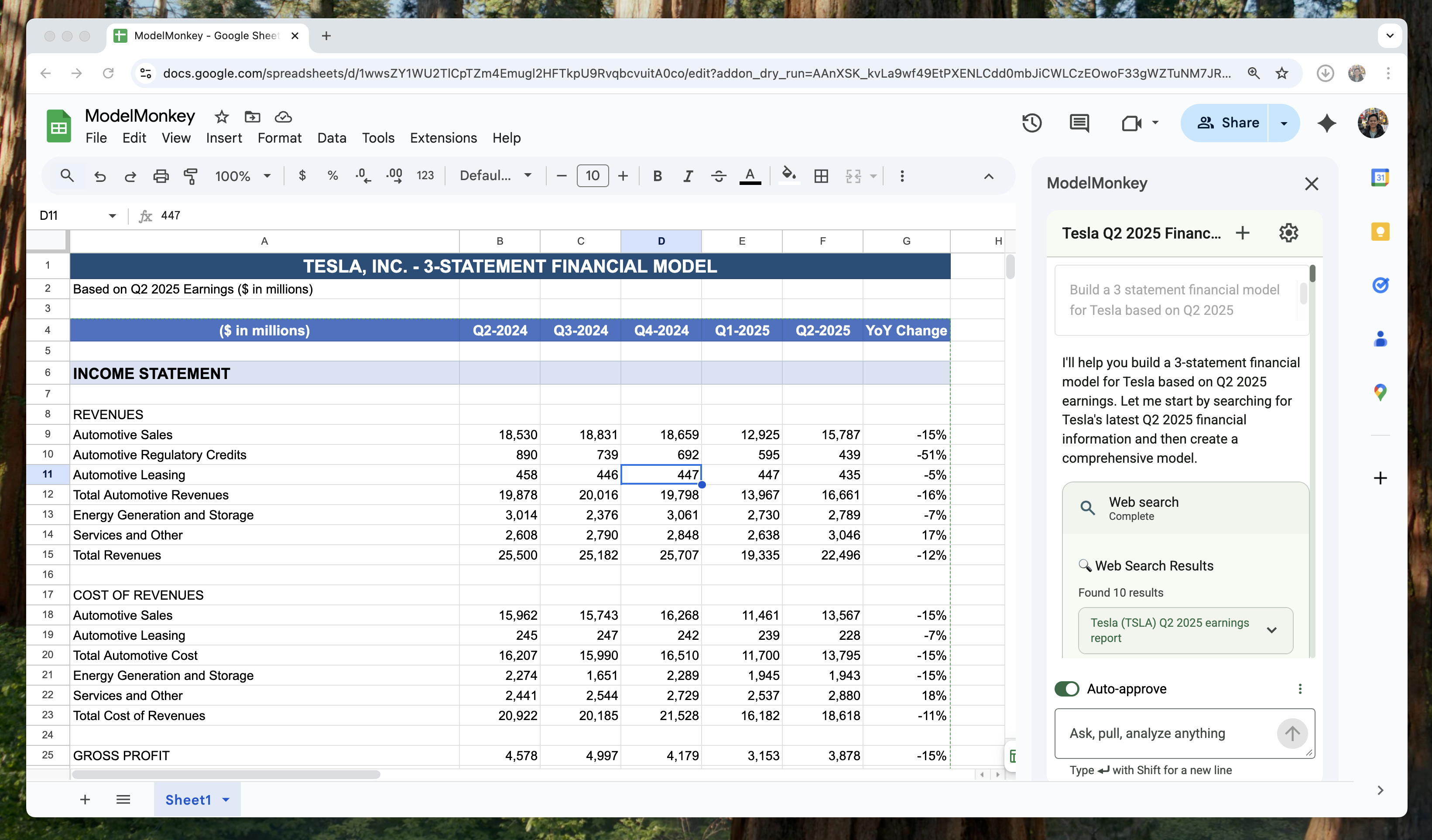
Watch how ModelMonkey turns a simple prompt into a complete spreadsheet — formulas, formatting, and all.
See how ModelMonkey transforms your workflow — instantly, with zero manual effort.
See ModelMonkey turn Tesla's Q2 2025 results into a complete 3-statement model — instantly, with zero manual work.
“Build a 3-statement model for Tesla using their latest 10-K”
“Create a DCF valuation model for a SaaS company with 40% gross margins”
“Pull NVIDIA's revenue data from the last 4 quarters and create a trend analysis”
Configured with spreadsheet-specific tools for multi-step financial analysis
Automatically applies standard formatting for assumption cells, same-sheet references, and formula cells
Implement your firm's conventions and modeling standards
Search the web and pull data from EDGAR, 10-Ks, 10-Qs, 8-Ks, proxy statements, and more
Formulas reference cells dynamically, making models easy to audit and maintain
Review and approve changes before they're applied to your model
We show you which cells changed, which formulas were created (and why), and which assumptions were made - because ModelMonkey is a partner, not a black box.
See exactly what changed, with one-click undo for each action. No mysterious edits.
We show you the formula and why we wrote it that way. Edit it if you disagree.
Your data is encrypted in transit (TLS 1.3) and at rest (AES-256). Always protected.
We process data to provide ModelMonkey. Your spreadsheet data is not used to train AI models.
Model intelligence matters. The interface around it is what keeps consequential workbook changes understandable and controlled.
Read ranges, formulas, tabs, and connected data without copying a workbook into a separate chat.
Inspect proposed spreadsheet changes and keep approval in the same place where the work happens.
Return to prior conversations and undo supported edits without reconstructing the task from scratch.
See what our users are saying about ModelMonkey
ModelMonkey is like having a dedicated analyst exploring your data, but without the downtime. It's been a tremendous timesaver in producing signals and trends from raw input data, allowing us to focus on validation and applications.
PhD Research Fellow
University Malaya
We built a client dashboard in minutes that would have taken an analyst hours. A few iterations with ModelMonkey gave us a working version we refined to client-ready quality. Our client was thrilled with the deliverable.
Partner, Commercial Director
Leading HR-tech company
What used to take me hours of complex analysis now takes seconds. ModelMonkey creates accurate, executive-ready summaries instantly.
Business Analyst
Jago Coffee